Battle Obstacle Format
Configuration reference
Obstacle image positioning
Obstacle image will always be placed in the same way:
- left side of obstacle image is aligned with left side of hex on the bottom row of hexes
- top side of image is aligned with top of the hex in topmost row of hexes (based on height of the obstacle)
Blocked tiles definition
How blocked tiles are defined depends on whether obstacle is absolute or not:
Non-absolute obstacles
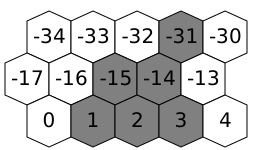
Non-absolute obstacles specify their coordinates relative to bottom-left corner of obstacle. If you wish to have obstacle that takes multiple rows, substracting 17 from hex number would block tile directly above bottom-left corner of your obstacle.
For example, obstacle that blocks tiles [1, 2, 3, -14, -15, -31] would result in following layout on the battlefield:
Absolute obstacles
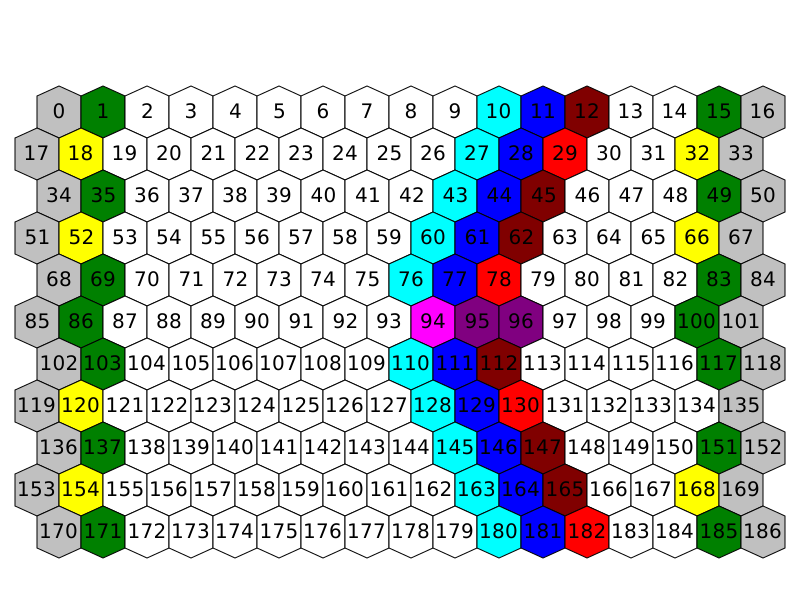
Absolute obstacles operate in absolute coordinates. Because of that, blocked tiles contains list of indexes of blocked tiles. For reference on tiles indexes see image below:
Troubleshooting
To help with tracking down problems with image positioning or blocked tiles, you can use obstacles debug command. To use it, enter any combat in game, open chat (for example by pressing tab) and enter /obstacles debug in chat.
This would export all images into <User cache directory>/extracted/obstacles (see Launcher -> Help for actual path on your system)
This directory will contain images of all non-absolute obstaclese loaded in game with additional debug info:
- hex grid placed over your image (size of hex grid matches width / height of your obstacle)
- shaded tiles that are blocked by your obstacle
- boundaries of your image
This command can also be used to quickly check all obstacles added by your mod instead of relying on random rolls and reentering multiple combats to locate all added obstacles.\